Sunday, July 5, 2009
Online Debate Hosts!
There is a social networking site that hosts written debates. If you was to write out essays discussing opinions on matters, you go into the site, login, and then set the parameters of the debate. You can set the number of rounds and even invite other people to read the exchanges. I have the feeling that I'm going to need this tool at Debate.org


Voice Twittering

 Blogger: Favorite Gadgets - Create Post
I just learned from Dr James White's Blog that there is a product, called vlingo. It allows you to send text messages and e-mail by talking to your phone! He plans to use it to twitter his thoughts that he doesn't have time to blog.This is an amazing idea that seems to work well for him so far. Vlingo works for Blackberry, IPhone, Nokia, and Windows Mobile! I'd like to try this method myself sometime soon. The Blackberry Demo is directly below.
IPhone Demo
Friday, July 3, 2009
Distributing Blog As PDF

I came across an interesting widget: PDF24. It allows you to give visitors the option to take a blog post they like, fill out their e-mail address and have the blog post e-mailed to themselves. I tried it on a blog I was reading yesterday and it worked. And it worked well. The only thing is that it took several hours to get the e-mail. I made the request yesterday morning and the e-mail came last night...several hours. The only other thing I did not like about it is that the plugin is optimized for Wordpress not Blogger/Blogspot which is what I use. Hopefully Blogspot will be supported soon.
So instead I found another hack for blogger that's not as elegant and I could not get it to work on my blog.
There are several tools offered by PDF24.
Top 10 Ad Programs for Web Publishers | TutorialFeed
Here is a post for free Ad programs for blogs/websites.
Top 10 Ad Programs for Web Publishers | TutorialFeed
Top 10 Ad Programs for Web Publishers | TutorialFeed
Megan Fox Trashes Transformers Committs Career Suicide!

I don't know if this report is true or not. I hope it's not. Apparently, Megan Fox has poo pooed Michael Bay's films as being special effects driven and not character driven. I mean that's career suicide! I don't know why she would say that. But Michael Bay has made a statement.
Michael Bay let his feelings be known in an interview with the WallStreet Journal;
Well, that’s Megan Fox for you. She says some very ridiculous things because she’s 23 years old and she still has a lot of growing to do. You roll your eyes when you see statements like that and think, “Okay Megan, you can do whatever you want. I got it.” But I 100% disagree with her. Nick Cage wasn’t a big actor when I cast him, nor was Ben Affleck before I put him in “Armageddon.”
Shia LaBeouf wasn’t a big movie star before he did “Transformers”—and then he exploded. Not to mention Will Smith and Martin Lawrence, from “Bad Boys.” Nobody in the world knew about Megan Fox until I found her and put her in “Transformers.” I like to think that I’ve had some luck in building actors’ careers with my films.
Talk about biting the hand that is biting you! I sure hope she isn't kissing her career goodbye.
Thursday, July 2, 2009
Microsoft Has A...Blog?

I was doing some research for my job today and I found out several things I didn't know. I was searching for information on Microsoft Visual Studio 2008. VS 2008 is an Integrated Developer Environment (IDE) which just means that it's software to help write other software. I have used previous versions of it practically daily since 1999. So Now we are looking to upgrade to a newer version. I've got to admit that I started with version 6 (released in 1998) and the product has only improved over the past 10 years (dang...am I that old?). I cam to find out (shock) that Microsoft is looking to release version 2010 next year and a Beta version is already available for download and (awe!) there is maintaining a blog on Google's blogspot for development notes and news on programming with Microsoft Products!
After comparing 2008 specs with 2010 specs it is my opinion that i should just upgrade to 2010 when it comes out and skip 2008 altogether. We want to be able to access the .Net coding languages, Python, Silverlight, parallel processing on multiple CPUs, and multi-threading. Visual Studio 2010 will give us all of this including easier automation of Microsoft Office products. Here is another site for more info on VS 2010 features.
The other thing is I found out about a coding library that can be run on Visual Studio 2005 or newer for making Facebook applications on top of ASP.Net application. It's called Facebook.Net and I've got to download it and check it out.
Here are the links I found on it.
Facebook.Net
VS.NET starter kit for Nikhil Kothari's Facebook.NET
Nikkil's blog post
Tuesday, June 30, 2009
Twitter Tools: Twitter Counter

I found a neat little gadget on the Black Snob blog. I've added it to my own blogs. What it is a site, called TwitterCounter, that works with your twitter account to count tweets, show a list of the latest visitors from twitter and buttons that display the number of followers you have on Twitter. It seems really cool!
Check it out!
Saturday, June 20, 2009
Generating HTML
 We have many different ways to write HTML for websites an HTML. These days we don't necessarily have to learn HTML or hire someone to write HTML code for you. There are a whole lot of tools that allow you you to assemble a web page and then upload it without having to write a single HTML tag. The issue is that you cannot always get what you want this way. Another option is using Microsoft Word to write the document the way you want and then use Word to translate the file to HTML afterward. You can make it work. However the HTML generated is not pretty or elegant. The issue is that it does not make valid official HTML code however most web browsers does work. But I have found another option if the following is true:
1. You cannot write your own HTML.
2. You have to use Microsoft Word.
You can use a program to clean up the HTML after Word Generates it. I found a great program called Detagger and it is easy to use. It can be used to fix the HTML file and make it work.
Friday, June 19, 2009
IPhone 3Gs
I have come across some very interesting information on the latest IPhone. For example we finally have video loaded on YouTube taken using the new IPhone and it looks great.
Secondly, G4TV has announced that Apple has released the latest operating system for the IPhone and IPod Touch. It's supposed to be universal for all Apple mobile devices and make updates simple. I want one.

Secondly, G4TV has announced that Apple has released the latest operating system for the IPhone and IPod Touch. It's supposed to be universal for all Apple mobile devices and make updates simple. I want one.

Wednesday, June 17, 2009
Must-Have Web-Site/Blog tools

1. Answer Tips - if a user double-clicks on a word in your blog, a window pops up with the word's definition.
2. Google Translate - allows your visitor to read your page in other languages: Simplified Chinese, French, German, Italian, Japanese, Korean, Russian, and Spanish
3. Google custom Search - register with Google and you can set up your own personal search engines specific for your own needs. mine searches all my blogs for the key word entered into the field.
4. Subscription - allows visitors to subscribe and get alerts when you post something or someone comments on one of your posts. It's one of the built-in gadgets for blogger.
5. Visitor Counter - counts the number of people who visit/view your blog each day.
6. Back Links Display - lists the websites that have linked to you.
7. FEEDJIT Live Traffic Map - displays map showing the location of all the visitors to your site!
8. Followers - from Google; allows people to "follow" your site so that everytime new content is being added, they get the information via RSS Feed in Google Reader.
9. Facebook Badge - displays your Facebook profile and the last message you sent on Facebook
10 Twitter - There are sever different versions; mine show the last 10 tweets I wrote and provides a link so that reader can subscribe to my twitter stream.
11. Labels - Lists all the tags for all the posts in the Blog and how many times they have been used; provided by Blogger.
12. Archive - Lists all the titles by month and year; provided by Blogger.
13 About Me - Profile; provided by Blogger.
14. Apture - Allow you add almost any video, document, or image to your post based on the content of the post.
15. LinkedWithin - puts linksfor related posts at the bottom of each post.
16. Add This - puts a button at the bottom of each post that allows user to share the contents of each post easily to all major social networking sites.
17. Standard Post footers - an icon for e-mailing a post, a poll of reactions (check boxes), labels for the post; provided by Blogger.
18. Register your site/blog with Technorati so that you can use it promote your site.
19. Register with Google Analytics so that you can get good statistical information about traffic on your site for free.
20. Radar URL - Tells you how many people are on your site in real time.
If you like any of the widgets/gadgets I covered or see some on my blogs that I did not cover here, and want help using them. Please let me know by leaving a comment.

Tuesday, June 16, 2009
Monday, June 15, 2009
Sharing Your Content on Popular Soclal Sites

Have you seen the drop down button on some websites where you put the mouse over them and you get a list of sites like Facebook, Twitter, and MySpace for sharing the content tied to the button? I've been wanting to add that to my blogs. The service is called Ad This and it si free. It's really easy to add. I've added it to all my sites. Go ahead and try it on this blog...even this post!
Friday, June 12, 2009
BackLinks For Your Site

For your blog or website, Backlinks is very important. A Backlink is when someone links to your blog or website. The more backlinks you have the more priority your blog and website when it's listed in search engines. I have been looking for tools, widgets, and gadgets for listing the websites/blogs that are linked to yours. Here are my top choices:
1. MakeCloud Backlinks Widget - generate a cloud of links representing all websites that are linked the site. It's easy to install.
2. BackLinkWidget - generates a widget that lists all the websites/blogs linked to yours. All you have to do input the url for your site/blog and then click the button and the code to put on your site is generated and all you have to is copy and post. It's easy to install.
3. Technorati Link Count Widget - is a widget that counts the links for each individual post. I had to go and look around for more information to try to find out how to install it but because of my blogs' templates it's not quite that simple to install. I really wanted this one to work. Fortunately, I found a great post on BloggerBuster explaining how to install it!
I'm going to install the Technorati Link Counter to all of my blogs. And I will add the Backlink Widget to my Favorite Media blog. What Had Happened Was... and Favorite Fiction will get the MakeCloud BackLink Widgit.
Thursday, June 11, 2009
Wednesday, June 10, 2009
PSP Go

I already own a PSP but I think it may be worth it to pick up the next version of the hardware this fall. It apparently will feature:
* Touch Screen
* Slide out additional controls
• The Go's 16 gigs of flash memory and bluetooth support ("You can also tether it to your cell phone,") are touted.
• In discussing the PSP Go's video-playing capability, it sounds like the rental service through PSN will extend to the PSP Go.
• PSP Go will not replace the PSP-3000; the 3000 will still be kept on the market.
• The PSP Go will arrive this fall.
• It's 43 percent lighter than the PSP-3000
• It has a 3.8-inch screen
* Games will be downloaded into the devices from the Internet
* UMD will be optional
Tuesday, June 9, 2009
Japanese, Hebrew, and Greek Fonts
Because i want to learn and do more with Greek and Hebrew, I decided to take the plunge and install Hebrew and Greek fonts on my computer. I downloaded from BibleWorks website.
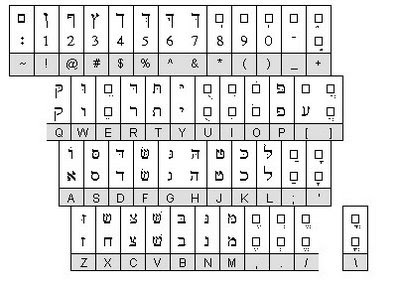
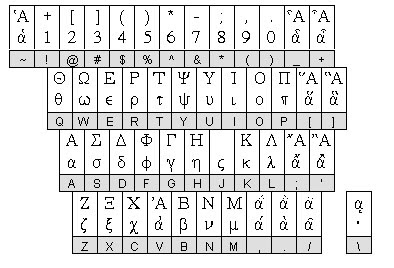
I also downloaded Japanese fonts while I was at it.
Here is how you install fonts on Windows XP


I also downloaded Japanese fonts while I was at it.
Here is how you install fonts on Windows XP
- Click Start | Settings | Control Panel and then double click the "Fonts" icon.
- In the Fonts applet click File | Install New Font.
- In the Add Fonts Dialog, navigate to the folder where the extracted fonts are located.
- Select the fonts and then click OK. The fonts are now installed.
Thursday, June 4, 2009
Announcement: Format No Change

Frequent readers of this blog may have noticed that I I usually pit all things of interest to me in terms of fiction on this blog. I've come to realize that I need to focus more on smaller topics to be of the most benefit to the readers and supporters. Therefore from now on this blog will not be changed in terms of content. It will continue to be for reviews, demos, announcements, and interviews but now only dealing with the Mugen community. I will now be maintaining 4 blogs.
1. Favorite Fiction will house all my Mugen related activities.
2. What Had Happened Was... will be for all the things I like to study: Theology, Science, Politics, News, Technology, and History.
3. Favorite Media will cover movies, television, YouTube, comic books, and music.
4 Favorite Gadgets will be used for field testing new web technology and widgets.
Please feel free to visit any of these blogs at any time and leave comments on any of them blogs or e-mail me. Thanks for your support
Saturday, April 25, 2009
Sharing Power Points

Okay, I have found a really cool tool for sharing powerpoint presentation. You can present them online live. You can embed them in blog/website or convert them into YouTube videos. Best part: It's free. This is a powerpoint that Mitsouky put together of our daughter using pictures from the first few weeks of her life.
Uploaded on authorSTREAM by mmcelhaney
Friday, April 17, 2009
Monday, April 13, 2009

Tuesday, April 7, 2009
Integrating Twitter, Facebook, and Your Own Content


I have found out how to announce every new blog or YouTube post I make on Twitter and Facebook automatically.
I have
 3 blogs. I look at blogging like journaling. This particular blog does not get updated much because it contain my favorite web gadgets and widgets. I use it primarily for testing and sharing information about new technologies. My main blog, What Had Happened Was..., covers my interests in my family, movies, television, history, apologetics, news, and a lot of general stuff. My other blog, Favorite Fiction, is where I share articles and posts on my favorite fictional characters from comics, v
 ideo games, movies, and other media and has become more like my MUGEN blog, where I can post characters I find and information. I ran into a problem. How do I announce new articles? I realized that Twitter and Facebook are great venues for this. However it is a pain to type out little blurbs and links for each article (I post at least one article a day). The answer is use the same RSS FEEDS that are used for Goggle Reader. There is this service called Twitter Feeds that allows you pac
 kage your blogs, website, YouTube feed, or any content into an RSS Feed that can be read and published in in Twitter and Facebook! Therefore when I publish an article an alert shows up on Twitter and Facebook. My favorite Fiction blog was getting many visits before I implemented this, but the main blog was getting an average of about 12 visits a day. Since I started feeding F
 acebook and Twitter the number of visits to my main blog has more than tripled! This could even work on MySpace.
1. Sign up for a Twitter account at Twitter
2. Sign up for a Facebook account at Facebook
3. Sign up for a Twitter Feed account at Twitter Feed
4. Use Twitter Feed to set up a feed for each content source you want to use. In my case I use my 3 blogs and Yo
 uTube
uTube5. Set up Facebook so that it uses those feeds from Twitter.
Done!
Google Translate

The Internet is truly global and is definitely not limited to the English speaking world. What if you come across a site that may have information you need but it's in a language you don't know how to read?! Been there? I have. Fortunately, God has given us Google. They have a web service and web site capable of translating words, sentences, or passages and even whole web pages into other languages! Go to Google Translate if you need to translate a word or page. I often use it and then copy/paste the translation into my e-mail. I'm not saying that the translations are as perfect as a human could do but it can help you make yourself understood. On top of that there is even a widget that you can place on your web page or blog that lets readers choose the language they want to read your content in. It's really cool. You can get the widget at the this link.
Monday, April 6, 2009
Chatterous - Chat Widget

I have found an interesting widget that allows one to set up a chat window on any blog or website and have 2-way conversation using the site, or mobile phones, or IMming, or e-mail! It seems interesting. Venture Beat has a great article on Chatterous. Go to Chatterous website and try it out. I've attached a chat widget to this blog post as a test and I think I will try to incorporate it into my other two blogs. Here is the information to join:

Monday, March 30, 2009
Using Mathematics on your Blog
Okay, I have often wondered how to add mathematical equations in blogger. It was perplexing me. So now I have found a couple of solutions.
1. Follow the following prescription on the following blog: Please Make A Note
2. Use the Latex Equation Editor because it allows you type in almost any equation and expression and gives you various forms such as HTML that can just be copied and pasted onto any site or blog you want. For example:

1. Follow the following prescription on the following blog: Please Make A Note
2. Use the Latex Equation Editor because it allows you type in almost any equation and expression and gives you various forms such as HTML that can just be copied and pasted onto any site or blog you want. For example:
Make Your Own Font
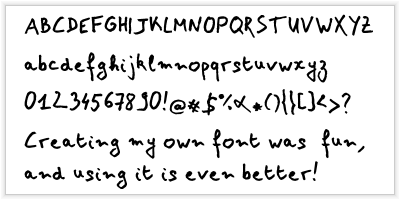
I found a website that allows you to make your own fonts. It’s easy. They provide a template that you download. You then write in all the letters and symbols you want as a part of your font. And then you scan the templates into a *.tiff image files and upload them back into the site. Then you can download a font and install it into you r computer. It is really slick! T think I really need to upload another version because my handwriting is not all that great.
To make your own font, You can go to the following website for more information:
In case I can't get my font to show up on my blog post I've embedded the page below.
Thursday, February 26, 2009
Saturday, January 31, 2009
Make Money With Amazon
I just found out about the Amazon Affiliate program. Amazon allows you to sell products on your web page or your own e-store in your website! All for free!!! You can even choose the products viewers on your page sees. When someone enters the Amazon.com system from your website/blog and purchase something, Amazon pays you 15%! Amazon even offers you all kinds of tools and visual aids you can easily incorporate into your website or blog. I thought I'd give it a try. Here is an example of my custom Amazon widgets! You can sign up by visiting the Amazon.com Associates program.
Sunday, January 18, 2009
Street Fighter on YouTube
I found out that there is a video where stop-motion animation of Street Fighter Action figures is used. Viewers "fight" by selecting buttons in the video. You can pick characters, and choose fighting moves by clicking buttons in the video, leading to other videos. It's cool. Check it out!
Wednesday, January 14, 2009
Subscribe to:
Posts (Atom)