Showing posts with label iPAD. Show all posts
Showing posts with label iPAD. Show all posts
Sunday, September 26, 2021


Wednesday, April 17, 2013
How to Write Your Own Siri Application (Mobile Assistant Application) - CodeProject
 |
| Siri HAL-9000 (Photo credit: AcidZero) |
How to Write Your Own Siri Application (Mobile Assistant Application) - CodeProject

Monday, January 7, 2013
XFINITY WiFi: Comcast WiFi, WiFi Access For XFINITY Internet Customers at No Extra Charge
This program allows one to connect two computers together and use their monitors together.

XFINITY WiFi: Comcast WiFi, WiFi Access For XFINITY Internet Customers at No Extra Charge

XFINITY WiFi: Comcast WiFi, WiFi Access For XFINITY Internet Customers at No Extra Charge
Monday, November 5, 2012


Tuesday, April 17, 2012
Get Yer Own Cloud
I've been researching how to create a personal cloud based on a home based file server for serving videos, movies, and other files not just on my own homework but privately and securely over the internet no matter where I am to a laptop, iPad, or Android device. Several solutions have presented themselves.
 Hamachi
It's not really free but it seems great for if you have a laptop. The issue is I really want a solution that can be used on an iPad or an Android device.
 iCloud
I tried Apple's iCloud, but I didn't think it was easy to set up and means I would have to be way more connected to iTunes than I want to be. Not enough freedom. I'm going to do some more research to see if it may be really useful remotely, but it only works for iOS and not Android.
 AirPlay
Is really slick for streaming video from a PC or MAC to an iOS device (iPad). Really easy to set up and simple to use. It doesn't work for Android and I could not figure out how to make it work remotely, (although I think it says it can when you install it.)
 ZappoTV
IS easy to set up and allows you to easily share media on all the devices on your home network. IT makes use of firmware already installed on Televisions. Worked great as long as all the mobile devices, PS3, and TV are on the same LAN. Can't use it Remotely.
 AllShare
Is Samsung's app that is used for medai serving. It comes pre-installed on all their devices. I still haven't consistently been able to make it work. And everything has to be on the same LAN
 Air Playit
Had me real excited at first, but I was disappointed by how hard it seemed to get it to work. It's supposed to work for Android and iOS but it's only easy to use on iOS. I mean it was real nice on my iPad running locally but it kept crashing my Galaxy S Tab. And I could not get the setting right to run it remotely even on the iPad.
 Tappin
Is really good. Very, Very Easy to set up. And you can access all of your files! All of them, even remotely. There is a free version that is serviceable. The only downside is that the free version does not stream. If you try to play a video, it's downloaded to your mobile device instead of streamed. I can see some real good uses for this one! Worked on iPad 2 and Android 3.1 Galaxy Tab.
 Tonido
Of all the Apps and services I looked at, I think Tonido is the best. Not only is it easy to set up, but the free version does stream music/audio and video! It even works remotely.
All in all, I think Tonido and Tappin are your best options if you want to stream video and audio and file serving in your own personal cloud environment.

It's not really free but it seems great for if you have a laptop. The issue is I really want a solution that can be used on an iPad or an Android device.

I tried Apple's iCloud, but I didn't think it was easy to set up and means I would have to be way more connected to iTunes than I want to be. Not enough freedom. I'm going to do some more research to see if it may be really useful remotely, but it only works for iOS and not Android.

Is really slick for streaming video from a PC or MAC to an iOS device (iPad). Really easy to set up and simple to use. It doesn't work for Android and I could not figure out how to make it work remotely, (although I think it says it can when you install it.)

IS easy to set up and allows you to easily share media on all the devices on your home network. IT makes use of firmware already installed on Televisions. Worked great as long as all the mobile devices, PS3, and TV are on the same LAN. Can't use it Remotely.

Is Samsung's app that is used for medai serving. It comes pre-installed on all their devices. I still haven't consistently been able to make it work. And everything has to be on the same LAN
Had me real excited at first, but I was disappointed by how hard it seemed to get it to work. It's supposed to work for Android and iOS but it's only easy to use on iOS. I mean it was real nice on my iPad running locally but it kept crashing my Galaxy S Tab. And I could not get the setting right to run it remotely even on the iPad.

Is really good. Very, Very Easy to set up. And you can access all of your files! All of them, even remotely. There is a free version that is serviceable. The only downside is that the free version does not stream. If you try to play a video, it's downloaded to your mobile device instead of streamed. I can see some real good uses for this one! Worked on iPad 2 and Android 3.1 Galaxy Tab.
Of all the Apps and services I looked at, I think Tonido is the best. Not only is it easy to set up, but the free version does stream music/audio and video! It even works remotely.
All in all, I think Tonido and Tappin are your best options if you want to stream video and audio and file serving in your own personal cloud environment.
Tuesday, April 3, 2012
6 Of The Best Free RSS Readers For The iPad

Of the 6, I'm gonna focus on this one:
Feeddler RSS Reader is the ideal app for Google Reader fans not only because it syncs with your account, but because the layout itself is practically identical to the web based version.
It includes a few Google Reader extras including sharing and adding stars. You can share your articles on Facebook or via email, but strangely enough not Twitter. Add new feeds directly from Feeddler and it will sync with your Google account.
6 Of The Best Free RSS Readers For The iPad
Drawing Pad - Drawing App

Drawing Pad - Android Apps on Google Play
Drawing Pad The Best Tablet Drawing App!
SketchBook Pro for iPad for iPad on the iTunes App Store

SketchBook Pro for iPad for iPad on the iTunes App Store
iPad Copy and Paste - Tutorial of How to Copy and Paste on iPad, iPad Copy Paste

iPad Copy and Paste - Tutorial of How to Copy and Paste on iPad, iPad Copy Paste
I Wanna Annotate on My iPad!

1. NotesPlus - for annotating PDF files, directly from DropBox
2. iAnnotate - for annotating Word Documents
3. “Document to pdf”. - turns word docs to PDFs
4. PDF Converter - converts Word Docs to PDFs
In the comments, some more options for iPad are:
1. GoodReader
2. Notability
And qPDF was offered for Android.
I Wanna Annotate on My iPad!

Thursday, March 8, 2012
The New iPad As A Gaming Device: A Look At Infinity Blade: Dungeons, Sky Gamblers - G4tv.com

The New iPad As A Gaming Device: A Look At Infinity Blade: Dungeons, Sky Gamblers - G4tv.com

Monday, January 9, 2012
Making a simple Twitter app using iOS 5, Xcode 4.2, and storyboards - CodeProject®
 |
| Image via CrunchBase |
How to use iOS 5, Xcode 4.2, and storyboards to create a simple Twitter app that will list tweets and show details about each tweet.
Making a simple Twitter app using iOS 5, Xcode 4.2, and storyboards - CodeProject®

Thursday, December 15, 2011
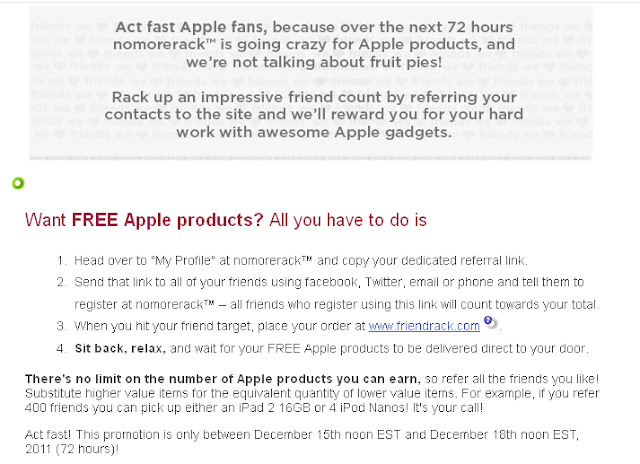
NoMoreRack.com is offering a great deal for anyone who joins their website. Sign up for free and save money on some great products and services and if you can get other people to do the same they will give you free apple products - from an iPod to an iPad 2.

 Follow the Link to sign up and invite everyone you know so you can get that iPad2!


 Follow the Link to sign up and invite everyone you know so you can get that iPad2!
Sunday, August 21, 2011
C#er : IMage: Tablet Development with Microsoft Silverlight
 Image via WikipediaThere was a very interesting article about developing apps on tablets, like an iPad. This article is a must read!
C#er : IMage: Tablet Development with Microsoft Silverlight

Tuesday, July 12, 2011
Samsung Galaxy Tab 10.1 Tech Review - G4tv.com

- The Galaxy Tab 10.1 is just as thin as the iPad 2, making it the thinnest Android tablet on the market.
- The Tab also weighs less than the iPad 2 but does not come with expandable memory or an HDMI out (unless you buy the dongle for $40).
- The Galaxy Tab has the same Android version as other Android tablets, which worked well.
- The touch screen feels a little more responsible than most of the other tables we've reviewed (aside from the iPad).
- There aren't any custom overlays or widgets unique to the Tab.
- You can still customize just like you would any other Android tablet.
- The tablet can also keep up with the iPad 2 when running apps or browsing the web: it was just as fast as any other tablet when launching Angry Birds Rio.
- The web browser was also just as fast.
- The front and back cameras were almost as good as we hoped.
- The rear camera is only 3 megapixels but the flash even exposes and it can record HD video.
- The picture quality turned out to be pretty good, too.
- The front camera is 2 megapixels and looks just fine.
- $500 for the 16GB or $600 for the 32 GB.
- 5 Seals of Approval out of 5. (How do we rate gadgets?)
Samsung Galaxy Tab 10.1 Tech Review - G4tv.com

Tuesday, March 15, 2011
iPad 2 Tech Review - G4tv.com

- It really is thinner than the iPhone 4 and about 30% thinner than the original iPad.
- A lot of people didn't like how heavy the first iPad was, so this one is about 4 oz. lighter.
- The newer dual core processor is supposed to double performance, and provide up to nine times better graphics when you're playing games and it's noticeably faster.
- Launching applications or loading web pages is definitely quicker than the original, which we expected, but the system itself is also peppier.
- Some games are already optimized for the iPad 2, like Infinity Blade and Real Racing 2; these look and play fantastic, and they really lend credence to the claim that the iPad is a full-fledged gaming device.
- Apps like iMovie and Garage Band are designed for the iPad 2 because of its speed and they're killer apps.
- iMovie runs better than it did on the iPhone 4, but the larger screen is really what makes this app a useful tool; it wasn't the easiest thing to use on the iPhone's small screen.
- Garage Band is a ton of fun on the iPad.
- We finally get front and rear cameras on the iPad.
- The rear camera takes good enough pictures and records 720p video, but it's not even close to the quality of the iPhone 4; it also doesn't have a flash.
- The front camera is only VGA quality, but of course, it works just fine with FaceTime; we liked FaceTimeing on the iPad more than the iPhone because of the huge screen.
- Apple also added video output, but you have to buy an HDMI adapter for an extra $40.
- Everything you do on the iPad 2 is mirrored through HDMI, whereas before, the original iPad would only have video out of certain apps.
- $500 for the 16 GB Wi-Fi version
- 5 Seals of Approval Out of 5 (How do we rate gadgets?)
- At that price, this is the best tablet on the market.
- Original iPad owners don't need to upgrade, but if you waited to buy, now's the time.
iPad 2 Tech Review - G4tv.com

Friday, November 26, 2010
Android OS on iPad and on iPhone 4 soon via OpeniBoot | Hello Android

Android OS on iPad and on iPhone 4 soon via OpeniBoot | Hello Android
Monday, November 8, 2010
YouTube - A Video for Geeks (iPad/Kindle/Touch/Incredible Discussion)
 Image by Getty Images via @daylifeJames White tells how he uses a MacBook, Droid Incredible, iPod Touch, iPad, and Kindle in his ministry. Some real great technology out there.
YouTube - A Video for Geeks (iPad/Kindle/Touch/Incredible Discussion)

Monday, November 1, 2010
Android Tablets Update
I have been researching tablets because I plan to get an iPad and Android tablet so I can develop for both platforms. There are way more Android tablets than I thought. These are the best version so far of Android tablets that I have been able to find.
1. enTourage eDGe
 It uses the Android 2.1 operating system and has most of all the technical features I want including Wi-Fi and bluetooth. The downside is that it doesn't have automatic re-positioning as you tilt it. And it doesn't allow you to get to the Android Market. It does however have dual screens! - around $500
2. 10.2 Epad APad Google Android 2.1 ZT180 Touch Screen Tablet PC 1GHZ CPU 3G
 This one is bigger and cost less than an iPad. It supports the Android Market. It doesn't have a built in Camera but you can add a web camera. It doesn't have bluetooth but it does have Wi-Fi. - $201.95
3. Android 2.1 Tablet PC-aPad-MID-7" TFT Touch Screen-ARM 11-Telechips 8902B-720MHZ-256 DDR2-2G-Wifi-Camera(SMQ5821)
 This one is about the same screen size as an iPad, has a camera, Wi-Fi, and no bluetooth. Supports the Android Market.
4.10inch ZT-180 Android 2.1 Touch Apad Epad Tablet PC
 Bigger than an iPad, Runs Android 2.1, Android Market, No bluetooth. - $154.99
5.eLocity A7 Touchscreen 7-Inch Android 2.2 Tablet (Black)
 Same size as the iPad, has blue tooth, Android market, Wi-Fi, 1.l3 MPixel camera - $369.99
6. 10.2 Android World Pad II aPad ePad Netbook Tablet PC
 Bigger than an iPAd, USB, Android Market, no BlueTooth. - $238.99
7. ePad 10.2" Android 2.1 Tablet PC ZT-180 1GHz WIFI MID Support Android market 3G
 Bigger than the iPad, has Android Market, no bluetooth but has Wi-Fi - $156.99
8.Samsung Galaxy Tab™ (T-Mobile)

This tablet by far is the most sophisticated version I've looked at. It comes out November 15. 2 Cameras. Run Android 2.2. Expensive - $700

1. enTourage eDGe

2. 10.2 Epad APad Google Android 2.1 ZT180 Touch Screen Tablet PC 1GHZ CPU 3G

3. Android 2.1 Tablet PC-aPad-MID-7" TFT Touch Screen-ARM 11-Telechips 8902B-720MHZ-256 DDR2-2G-Wifi-Camera(SMQ5821)
4.10inch ZT-180 Android 2.1 Touch Apad Epad Tablet PC
5.eLocity A7 Touchscreen 7-Inch Android 2.2 Tablet (Black)
6. 10.2 Android World Pad II aPad ePad Netbook Tablet PC
7. ePad 10.2" Android 2.1 Tablet PC ZT-180 1GHz WIFI MID Support Android market 3G
8.Samsung Galaxy Tab™ (T-Mobile)

This tablet by far is the most sophisticated version I've looked at. It comes out November 15. 2 Cameras. Run Android 2.2. Expensive - $700
Friday, October 22, 2010
Turning Your Blog Into Mobile Smart-Phone App (Apple Devices)
 I've been looking up information about how to turn a blog into an App for mobile phones. In this case for making an App for iPhone, iPod Touch, and iPad.
Turn Your Blog Into An iPhone App With MyAppBuilder
Turn Your Blog Into An iPad Web App With PadPressed
Turn Your Blog Into a Native iPhone App in 10 Steps
Does your blog need a mobile app?
Turn Your Blog into an iPhone App with AppLoop

Subscribe to:
Posts (Atom)