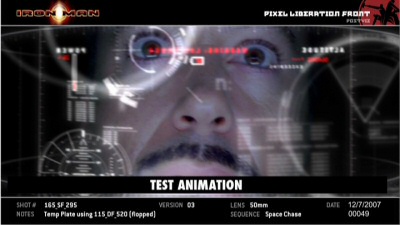
I love the idea of personal heads-up displays (HUDs)! I know the goal is like what we see in Science fiction like Iron Man, but I think it's possible. My only question is what about if you already wear glasses?
Google Is Planning Pricey Glasses With An Augmented Reality Heads-Up Display, May Sell Them By Year's End | Hello Android
This blog will hold favorite gadgets and graphic user interfaces that don't really fit in my main blog @ mmcelhaney.blogspot.com
Showing posts with label Global Positioning System. Show all posts
Wednesday, February 22, 2012
Tuesday, May 3, 2011
Animating Google Earth (3D) & Map (2D) for Live GPS via Ajax and RestFul Web Service - CodeProject
Related articles
- Download Google Earth 6.0.2 Final Version (mydigitallife.info)
- Mapping the BolderBOULDER in 3D (google-latlong.blogspot.com)
- How do you download new features for google earth (wiki.answers.com)
- Google Earth Kml/Kmz (jdhhomeschool.wordpress.com)
Labels:
Animation,
Global Positioning System,
Google,
Google Earth,
search
Thursday, April 14, 2011
Map yourself with LinkUp GPS | Widgets Lab
From the Developers.
Map yourself with LinkUp GPS | Widgets Lab
If your friends have Android or IPhones, LinkUp provides device specific links that will allow them to navigate directly to you with with one click from their phone! Say you’re at a soccer, baseball or football game and your friends have seats elsewhere, don’t waste game time and send them a link to let them find you!
Map yourself with LinkUp GPS | Widgets Lab
Labels:
Android,
AndroidMarket,
App,
Global Positioning System,
googlemaps,
GPS,
Handhelds,
LinkUp,
Wi-Fi
Thursday, August 26, 2010
Augmented Reality - Layar Reality Browser - Homepage
What is Layar?
The Layar Reality Browser shows what is around you by displaying real time digital information on top of the real world as seen through the camera of your mobile phone. This technology is called Augmented Reality. We augment the real world as seen through your mobile phone, based on your location.How does Layar’s Augmented Reality work?
The idea is simple: Layar works by using a combination of the mobile phone’s camera, compass and GPS data to identify the user’s location and field of view, retrieve data based on those geographical coordinates, and overlay that data over the camera view.
Augmented Reality - Layar Reality Browser - Homepage
Related articles by Zemanta
- Layar goes bada; Now available on the Samsung Wave! (intomobile.com)
- 'Don't Retreat, Reload.' Layar: BattleTac's 'Augmented Reality' App For The Battlefield (crunchgear.com)
- Layar Reality Browser - Augmented Reality software - Layar B.V. (itunes.apple.com)
- Layar Reality Browser now in version 3.5 (intomobile.com)
- Layar debuts new augmented reality browser, bets big on content discovery (mobilecrunch.com)
- Augmented Reality Still in Its Infancy, Says Layar (pcworld.com)
- Layar's New Augmented Reality Browser Makes For A Strong Location Play (techcrunch.com)
Labels:
Android,
Digital,
Global Positioning System,
GPS,
Layar,
Layar Reality Browser,
Mobile phone
Subscribe to:
Posts (Atom)


