Showing posts with label Web Browser. Show all posts
Showing posts with label Web Browser. Show all posts
Tuesday, October 8, 2019
GitHub - roundonejs/roundonejs: Run M.U.G.E.N games in browser.
GitHub - roundonejs/roundonejs: Run M.U.G.E.N games in browser.: Run M.U.G.E.N games in browser.


Play Spider-Man: The Videogame (World) Online MAME Game Rom - Arcade Emulation on Spider-Man: The Videogame (World) (MAME)

Play Spider-Man Games - Emulator Online

Tuesday, August 4, 2015
FrequentlyAskedQuestions - selenium - WebDriver FAQs - Browser automation framework - Google Project Hosting

Q: What is WebDriver?
A: WebDriver is a tool for writing
automated tests of websites. It aims to mimic the behaviour of a real
user, and as such interacts with the HTML of the application.
FrequentlyAskedQuestions - selenium - WebDriver FAQs - Browser automation framework - Google Project Hosting
Thursday, July 12, 2012
Let's Do Basic Graphics on the Browser - CodeProject

Let's Do Basic Graphics on the Browser - CodeProject
Saturday, April 21, 2012
Cross-browser drag and drop - CodeProject®
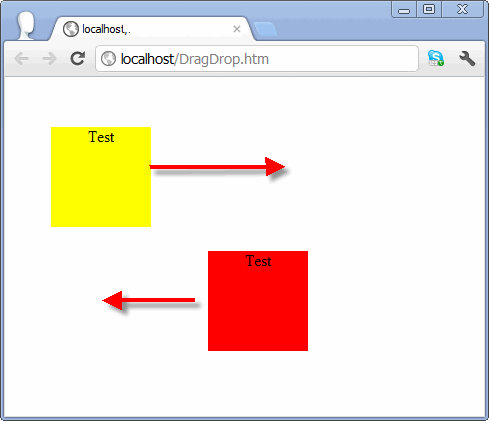
I could not find a good Drag and Drop JavaScript example that would work in all browsers (including iPad). So I wrote one myself. I hope someone might find it useful. Please note that this example shows how to “capture” the element so that you don’t lose it if you move outside of the element or outside of the browser window.
Unfortunately, I could not find a good way how not to lose capture over aniFramein Chrome and Safari. The best approach I found is to cover alliFrames withDIVs while the dragging is taking place. Any suggestions on how to do this better are welcome.
This article is for those that like nuts and bolts and are not using third party libraries like jQuery. There is nothing wrong with using third party libraries – I just like more flexibility. For example, you can use this example to resize elements.
Cross-browser drag and drop - CodeProject®
Sunday, August 14, 2011
Remofi - Your Own PowerPoint Controller for Mobile Devices - CodeProject

This article illustrates a way to control your computer program through your mobile WIFI device like a mobile phone. You don't have to install any software on the mobile device, but rely on its web browser. What you need to do is to launch the Remofi on your PC which you want to control. The Remofi will listen to a port you choose (by default, it's 1688, a lucky number the Chinese people love most), and then by visiting the IP address/port you choose, you can control your PowerPoint.
Remofi - Your Own PowerPoint Controller for Mobile Devices - CodeProject

Thursday, May 26, 2011
Silverlight: How to Receive Messages from Desktop Application - CodeProject
 Image via WikipediaIntroduction to Article
The article is a free continuation of How to Send Message to Desktop Application where the Silverlight application sends a text message to the desktop application. Now I would like to show how the Silverlight application can receive text messages from the desktop application using TCP connection. (Actually, the example below shows the bidirectional communication between the Silverlight application and the desktop application.)
Silverlight: How to Receive Messages from Desktop Application - CodeProject
Very simple example showing how to send a message from Silverlight application to standalone desktop applicationSilverlight: How to Send Message to Desktop Application - CodeProject
The article shows how to implement receiving of notification messages from the hosting server in the Silverlight application by using
Eneter.Messaging.Framework.Basically there are two approaches if you need to implement the communication scenario where the Silverlight client needs to be notified about some events on the server:
Silverlight: Notification Messages from the Server - CodeProject
The article shows how to implement communication between Silverlight application and some non-Silverlight application by using Eneter.Messaging.Framework. The example shows Silverlight client invoking requests to the console application. The request can be paused, resumed or cancelled.
Silverlight: Interprocess Communication from Silverlight Application - CodeProject
Summary: The article shows how to use Eneter.Messaging.Framework for the communication between Silverlight applications to send typed messages (no size limitation).
Silverlight: Comunication between Silverlight Applications with Typed Messages - CodeProject

Tuesday, May 3, 2011
Silverlight Elevated Permissions
Image via WikipediaHere is a good article:
Among the new features introduced with Silverlight 3.0, Out-of-Browser is certainly one that has aroused more interest among developers as it opens very interesting usage scenarios that go beyond the traditional Web application, with version 4.0 this feature has been enhanced with additional options that makes it a viable alternative to classic desktop applications.
Silverlight Elevated Permissions

Saturday, November 13, 2010


Thursday, September 16, 2010
Skyfire browser reaches 1 million downloads | Widgets Lab

You’ve probably heard of the Skyfire Flash-enabled browser before this, and now the company is happy to announce that its browser has breached the 1 million mark. If your mobile device hasn’t received official support for Adobe Flash just yet, Skyfire would be a simple way to enjoy Flash on your device. Skyfire is currently compatible with a wide variety of phones that includes the HTC EVO 4G, Droid Incredible, Droid X, Droid 2, and Samsung Galaxy S (and its variants). You can currently download the latest version of Skyfire (2.3.2) from the Android Market.Skyfire browser reaches 1 million downloads | Widgets Lab

Monday, August 16, 2010

Thursday, April 8, 2010


Subscribe to:
Posts (Atom)