This blog will hold favorite gadgets and graphic user interfaces that don't really fit in my main blog @ mmcelhaney.blogspot.com
Showing posts with label Samsung. Show all posts
Wednesday, February 12, 2020
Thursday, July 3, 2014
Utilize the Accessory File Transfer on Samsung Gear - CodeProject
Article Intro
Utilize the Accessory File Transfer on Samsung Gear - CodeProject
The tutorial found below analyzes how a Samsung Gear File Transfer
application is created. This session is a four-part series. Parts 1 and 2
show the development on the Android part of the application. The first
deals with the Service part of the application, while the second deals
with the creation of the Activity part. Part 3 shows the development of
the Tizen part of the application. Finally, Part 4 demonstrates the
complete Gear File Transfer application, which is a package composed of
the combined Tizen part and the Android part.
Utilize the Accessory File Transfer on Samsung Gear - CodeProject
How to get user activity from Gear using Remote Sensor - CodeProject
Article Intro
How to get user activity from Gear using Remote Sensor - CodeProject
The tutorial found below discusses how to create a Samsung Gear Remote
Sensor application. Remote Sensor allows you to collect remote sensor
data from a wearable device. The data can be a pedometer data, user
activity event, or wearing state. Bluetooth communication facilitates
the transfer of sensor data from the wearable device. The Remote Sensor
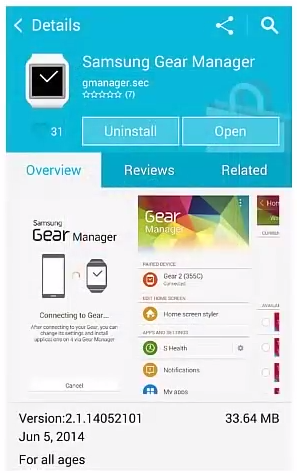
Service, packaged in the SDK, uses the Gear Manager to support the
Bluetooth communication with wearable device.
How to get user activity from Gear using Remote Sensor - CodeProject
Monday, April 21, 2014
Essential Tweaks for Your New Samsung Galaxy S5 - Tested
I just got the the Galaxy S 5 and I like it .Here are two links that I have found useful!
11 Essential Tweaks for Your New Samsung Galaxy S5 - Tested
Galaxy S5 Features: What to Enable and Disable
11 Essential Tweaks for Your New Samsung Galaxy S5 - Tested
Galaxy S5 Features: What to Enable and Disable
Tuesday, December 4, 2012
How to Get Free Wifi Tether / Hotspot on the Samsung Galaxy S III - YouTube
Great video for doing free WiFi Tether/Hotspot with Samsung Galaxy S 3
How to Get Free Wifi Tether / Hotspot on the Samsung Galaxy S III - YouTube
Labels:
Android,
Samsung,
Samsung Galaxy,
Samsung Galaxy S III,
Wi-Fi,
YouTube
Saturday, November 24, 2012
TecTiles: programmable NFC stickers for select members of Samsung's Galaxy
I recently got a Samsung Galaxy S III and I am going to have fun with the near field technology. I hadn't heard of this technology's use until yesterday using Samsung TecTiles.
We can use the this technology to do things like programming your phone to Turn Wi-Fi or Bluetooth on and off, call home, send a prewritten text, Open a webpage, update your status on Facebook, and many other ideas.
Use Samsung TecTiles to automagically execute tasks on your Android device
TecTiles: programmable NFC stickers for select members of Samsung's Galaxy
Download the App
Samsung TecTiles is a two-part process. Firstly, to use Samsung TecTiles you need to purchase TecTile tags, which cost $14.99 for a set of five NFC tags/chips. These tags store commands and limited data (they are not attached to devices, don't mistakenly stick it to your device). TecTile tags can be bought directly from Samsung's website or other authorized sellers. Secondly, after you have TecTile tags, you need to download Samsung TecTiles app from Google Play Store (it is free); this app is used to program the tags (store commands in them). Once you have both the tags and app, you can read from and write to the TecTile tags.
We can use the this technology to do things like programming your phone to Turn Wi-Fi or Bluetooth on and off, call home, send a prewritten text, Open a webpage, update your status on Facebook, and many other ideas.
Use Samsung TecTiles to automagically execute tasks on your Android device
TecTiles: programmable NFC stickers for select members of Samsung's Galaxy
Download the App
Tuesday, March 27, 2012
A Free DLNA Media Server For Mac, Windows, and Linux
I have been looking for months for a good media server to install on PCs and Macs for serving media out to Samsung devices that run AllShare,. I think that this is my answer.
A Free DLNA Media Server For Mac, Windows, and Linux
Wednesday, October 26, 2011
REVIEW: Samsung Galaxy S II for T-Mobile
My next phone!
REVIEW: Samsung Galaxy S II for T-Mobile
Related articles
- Review: Samsung Galaxy S II for T-Mobile (phonescoop.com)
- Samsung Exhibit II 4G brings Galaxy W to T-Mobile on Oct. 27 (electronista.com)
- New Samsung GALAXY Note TV Commercial (great-ads.blogspot.com)
Thursday, October 6, 2011
Galaxy S II vs. iPhone 4S comparison grid | Widgets Lab
Samsung on Tuesday evening delivered a comparison grid to BGR that pits Apple’s new iPhone specs against Samsung’s wildly popular Galaxy S II line of handsets, and the tale of the tape appears to favor the latter.
Specific highlights include the Galaxy S II’s 4G WiMAX and HSPA+ outshining HSPA 14.4 on the iPhone 4S, Samsung’s 4.3-4.5-inch Super AMOLED Plus displays outclassing Apple’s 3.5-inch Retina Display, and Samsung’s slim smartphone weighing in at more than half an ounce less than Apple’s hefty 4.9-ounce handset. Samsung’s full comparison grid follows below.
Related articles
- Samsung releases iPhone 4S vs Galaxy S II Product Spec sheet (slashgear.com)
- Samsung counters iPhone 4S with Galaxy S II comparison chart (geek.com)
- Apple iPhone 4S vs. Samsung Galaxy S II - Which Is The Ultimate Smartphone? (techie-buzz.com)
- Samsung downplays iPhone 4S, emails customers a convenient comparison chart (9to5google.com)
- iPhone 4S vs. The Competition: Spec Showdown Chart (pcworld.com)
Labels:
Apple,
Galaxy S II,
IPhone,
iPhone 4,
S-II,
Samsung,
Samsung Group,
WiMAX
Friday, September 2, 2011
Thursday, September 1, 2011
Samsung Beam (PROJECTOR PHONE) « MGIT ECE
Wow! Samsung has a projector Android phone!
Samsung Beam (PROJECTOR PHONE) « MGIT ECE
Related articles
- Samsung's Galaxy Note supersizes the smartphone with 5.3 inch screen and stylus (gizmag.com)
- Android Phone of the Day (geeks.thedailywh.at)
- Would You Buy A 5-Inch Android Phone That Comes With A Stylus? (businessinsider.com)
- The Cheap Android Phone Is Here, But It's Not What You'd Expect (osnews.com)
Tuesday, August 9, 2011
Install CyanogenMod 7 Gingerbread on Samsung Galaxy Tab
Related articles
- CyanogenMod In The Works For Galaxy S II, Thanks To Samsung (pocketnow.com)
- CyanogenMod Gets First Official Galaxy S Release - Captivate Nightlies, Now Serving Gingerbread 2.3.4 (GRJ22) On Aisle You (androidpolice.com)
- Samsung Delivers Galaxy S II to CyanogenMod Dev, Says Get to Work (phandroid.com)
- CyanogenMod7 Nightlies Welcome Samsung Galaxy S II (pocketnow.com)
- Samsung Galaxy S 2 gets CyanogenMod 7 nightly build (intomobile.com)
Labels:
Android,
CyanogenMod,
Gingerbread,
Google,
Samsung,
Samsung Galaxy S,
Samsung Galaxy Tab
Tuesday, July 12, 2011
Samsung Galaxy Tab 10.1 Tech Review - G4tv.com
What You Need To Know
Read more: http://www.g4tv.com/thefeed/blog/post/714446/samsung-galaxy-tab-101-tech-review/#ixzz1Rws2efBW
Samsung Galaxy Tab 10.1 Tech Review - G4tv.com
- The Galaxy Tab 10.1 is just as thin as the iPad 2, making it the thinnest Android tablet on the market.
- The Tab also weighs less than the iPad 2 but does not come with expandable memory or an HDMI out (unless you buy the dongle for $40).
- The Galaxy Tab has the same Android version as other Android tablets, which worked well.
- The touch screen feels a little more responsible than most of the other tables we've reviewed (aside from the iPad).
- There aren't any custom overlays or widgets unique to the Tab.
- You can still customize just like you would any other Android tablet.
- The tablet can also keep up with the iPad 2 when running apps or browsing the web: it was just as fast as any other tablet when launching Angry Birds Rio.
- The web browser was also just as fast.
- The front and back cameras were almost as good as we hoped.
- The rear camera is only 3 megapixels but the flash even exposes and it can record HD video.
- The picture quality turned out to be pretty good, too.
- The front camera is 2 megapixels and looks just fine.
- $500 for the 16GB or $600 for the 32 GB.
- 5 Seals of Approval out of 5. (How do we rate gadgets?)
Read more: http://www.g4tv.com/thefeed/blog/post/714446/samsung-galaxy-tab-101-tech-review/#ixzz1Rws2efBW
Samsung Galaxy Tab 10.1 Tech Review - G4tv.com
Related articles
- UK: Samsung Galaxy Tab getting the Android 2.3 Gingerbread update "within the next couple of weeks" (intomobile.com)
- Want Touchwiz UX On Your Samsung Galaxy Tab 10.1 Now? No Need To Wait - Flash This (androidpolice.com)
- Samsung Mobile loses CTO responsible for GSII and Galaxy Tabs (slashgear.com)
- Tabletpalooza Week One Reminder FINAL: Win a Galaxy Tab 10.1! (slashgear.com)
- Samsung Galaxy Tab getting Android Gingerbread this month (somobile.co.uk)
Labels:
Android,
G4TV,
iPAD,
iPad 2,
Samsung,
Samsung Galaxy Tab,
tab,
Tablet,
Tablet computer
Thursday, June 30, 2011
Tuesday, February 1, 2011
Friday, January 21, 2011
Monday, December 13, 2010
Sunday, December 12, 2010
Samsung Galaxy Tab Tech Review - G4tv.com
I don't agree with G4's reviews of the Galaxy Tab. I like the device very much. See what you think
Samsung Galaxy Tab Tech Review - G4tv.com
Sunday, November 28, 2010
How To: Root And Unroot Samsung Galaxy S i9000 With A Single Click
Related articles
- How to Root Samsung Galaxy Tab (via One-Click App) (mydigitallife.info)
- Galaxy Tab root (and others) just a few clicks away with z4root root (androidcentral.com)
- Samsung Galaxy S Froyo Rollout Begins Once Again (pocketnow.com)
- Samsung Pulls Froyo Source for Galaxy S i9000 Phones (pocketnow.com)
Labels:
Android,
Samsung,
Samsung i9000 Galaxy S,
Samsung Vibrant
Monday, November 22, 2010
Review: Samsung Galaxy Tab Android Tablet by VR-Zone.com
I like the Samsung Galaxy Tab. I think it is the best Android tablet available today. There are only two things I've tried to do with it that hasn't worked extremely well. The Vibrant seems to do media serving a little better than the Tab. And I still cannot play movies in the *.avi format. Not a deal breaker because you can easily convert it into file formats that the tab can play. However *.flv files play well. One thing I like is being able to connect up to 5 devices to a tab and share its Internet connection.
Review: Samsung Galaxy Tab Android Tablet by VR-Zone.com
Related articles
- Samsung: 600,000 Galaxy Tabs Sold So Far (informationweek.com)
- "Review: Samsung Galaxy Tab Android Tablet" and related posts (vr-zone.com)
- Samsung has sold 600,000 Galaxy Tabs (tech.fortune.cnn.com)
Subscribe to:
Posts (Atom)


