Showing posts with label Bluetooth. Show all posts

Thursday, July 3, 2014

How to get user activity from Gear using Remote Sensor - CodeProject

Article Intro


The tutorial found below discusses how to create a Samsung Gear Remote
Sensor application. Remote Sensor allows you to collect remote sensor
data from a wearable device. The data can be a pedometer data, user
activity event, or wearing state. Bluetooth communication facilitates
the transfer of sensor data from the wearable device. The Remote Sensor
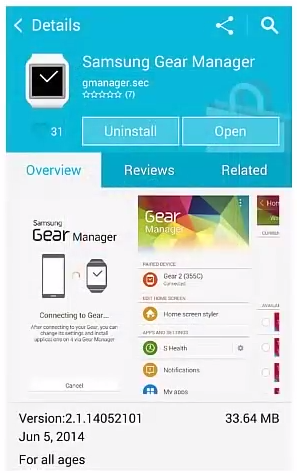
Service, packaged in the SDK, uses the Gear Manager to support the
Bluetooth communication with wearable device.


How to get user activity from Gear using Remote Sensor - CodeProject

Thursday, September 1, 2011

How To Gain Full Market Access in ViewSonic G-Tablet

I recently had a chance to play with the ViewSonic G-Slate Android tablet. I bought the 10 inch version for my wife. It's awesome and has a lot of great qualities. Unfortunately, it does have some problems. It isn't completely open enough to install whatever you want. However it has been hacked and you can do almost anything you want. Here are a few links that teach you how to take your G-Slate off the chain.

How To Gain Full Market Access in ViewSonic G-Tablet

[GUIDE] Install ClockworkMod, a ROM, Flash Player, and the Market Fix

How To: Unleash The Power Of The Viewsonic G Tablet And Turn It Into The Best Performing Tablet On The Market

Viewsonic G Tablet, From Rags To Riches - An Owner's Guide To Making The Best Of A Great Tablet

Alternatively, you can just load the Market, Gmail, and Maps on the tablet and allow more apps to be easily loaded

The Viewsonic G Tablet Super Thread (w/Market, Gmail, and Maps!)

But you need the AndRootFile to do the steps given in the link above can be found from the following thread:

[Q] AndRootFile or any other file manager that supports root access
Enhanced by Zemanta

Wednesday, November 3, 2010

Comparing 15 Android Tablets

Android LogoImage by Arvid via FlickrHere is a Spreadsheet I put together comparing different tablets running android. I'm torn because none of them really does exactly what I want. I want a tablet 7 -10 inches, 1 Ghz processor, SD memory card slot, HDMI, Bluetooth, Wi-Fi, Camera, Android 2.2 OS, Flash 10.1 or better, and access to Android Market. I want to be able to play video formats such as flv, mp4, Mpeg II, mkv, mov, vob, and wmv. I want audio: mp3, aa, and ogg. I want to be able to stream content as well. To be honest the Samsung Galaxy tablet does all of this but it is the most expensive and I don't want to run 3G. i have my phone for that.


Enhanced by Zemanta

Monday, November 1, 2010

Android Tablets Update

I have been researching tablets because I plan to get an iPad and Android tablet so I can develop for both platforms. There are way more Android tablets than I thought. These are the best version so far of Android tablets that I have been able to find.
1. enTourage eDGe
It uses the Android 2.1 operating system and has most of all the technical features I want including Wi-Fi and bluetooth. The downside is that it doesn't have automatic re-positioning as you tilt it. And it doesn't allow you to get to the Android Market. It does however have dual screens! - around $500
2. 10.2 Epad APad Google Android 2.1 ZT180 Touch Screen Tablet PC 1GHZ CPU 3G
This one is bigger and cost less than an iPad. It supports the Android Market. It doesn't have a built in Camera but you can add a web camera. It doesn't have bluetooth but it does have Wi-Fi. - $201.95
3. Android 2.1 Tablet PC-aPad-MID-7" TFT Touch Screen-ARM 11-Telechips 8902B-720MHZ-256 DDR2-2G-Wifi-Camera(SMQ5821)
This one is about the same screen size as an iPad, has a camera, Wi-Fi, and no bluetooth. Supports the Android Market.
4.10inch ZT-180 Android 2.1 Touch Apad Epad Tablet PC
Bigger than an iPad, Runs Android 2.1, Android Market, No bluetooth. - $154.99
5.eLocity A7 Touchscreen 7-Inch Android 2.2 Tablet (Black)
Same size as the iPad, has blue tooth, Android market, Wi-Fi, 1.l3 MPixel camera - $369.99
6. 10.2 Android World Pad II aPad ePad Netbook Tablet PC
Bigger than an iPAd, USB, Android Market, no BlueTooth. - $238.99
7. ePad 10.2" Android 2.1 Tablet PC ZT-180 1GHz WIFI MID Support Android market 3G
Bigger than the iPad, has Android Market, no bluetooth but has Wi-Fi - $156.99

8.Samsung Galaxy Tab™ (T-Mobile) 


This tablet by far is the most sophisticated version I've looked at. It comes out November 15. 2 Cameras. Run Android 2.2. Expensive - $700
Enhanced by Zemanta

Sunday, August 22, 2010

Use Android to Remote Control Your computer

Image representing Android as depicted in Crun...Image via CrunchBaseI've been looking for the best solution to turn an Android Phone into a remote control for Windows. I have found four applications that work extremely well provided you have Android 2.0 or better installed. These are easy to use and install. The structure is similar for each one: you install an app on the phone that acts as a client and a program on the computer you want to remote control that acts as a server. If you want to control the computer of Wi-Fi both the phone and the computer have to be connected to the same access point and you just type in the computer's IP address into the phone app and you're good to go. If you want to use Bluetooth, you just have to pair the computer with the phone and then you are good to go. Here is a comparison chart for the four best apps I have found and how they are different. I suggest using all of them depending on what you are trying to do.
LOGO NAME URL Wi-Fi Bluetooth 3G Special
Features
Cost
GMote http://www.gmote.org/ X Controls all shared folders, stream music and video from computer to phone Free
pptRemote http://www.pptremotecontrol.com/ X X Controls powerpoint presentation, and displays notes on the phone Free
RRemoteDroid http://code.google.com/p/premotedroid/ X X Offers control of computer Free
AndRemote http://andremote.anddev.org/ X
X Most customizable. You can have different layouts for different programs you want to control on the PC. You can even make your own. €0.99
Enhanced by Zemanta

Monday, August 9, 2010

Control Pc Via Bluetooth Enable Mobile

I've been studying and researching how to use Android phones to remote control computers using WiFi and blue tooth. I found this paper explaining how such software is designed.


Control Pc Via Bluetooth Enable Mobile

Tuesday, August 3, 2010

Vectir - IR and Bluetooth Remote Control Free Download and Review

I haven't been able to get this to work yet, but it seems to be the most likely solution I need to control computers from an Android phone via bluetooth or wireless.

Vectir - IR and Bluetooth Remote Control Free Download and Review
Enhanced by Zemanta

Friday, July 9, 2010

Vectir - IR and Bluetooth Remote Control 2.2.0.0 Download

Image representing Android as depicted in Crun...Image via CrunchBase
This is another way to turn your phone into a computer remote over bluetooth. The problem is my phone doesn't have Android 2.0! However it's nto free and it says it will work with 1.6, I doubt it. I guess I'll just have try it out.

Vectir - IR and Bluetooth Remote Control 2.2.0.0 Download
Enhanced by Zemanta

Saturday, January 9, 2010

YouTube - DELL Touchscreen Android leaked on film - CES 2010

Consumer Electronics ShowImage via Wikipedia
Here is the video description!
Video footage of the Dell Streak - a 5-inch, touchscreen, Android-based mobile internet device, or MID - has hit the net.

Tinhte has gotten hold of one of the mythical machines and it looks like a pretty nifty internet tablet-type offering, although being much larger than a phone and much smaller than a netbook means it won't appeal to everyone.

With a 800 x 480 resolution screen, it's thought to run Android 2.0 and offer Bluetooth, 3G, a 5-megapixel camera with LED flash, a microSD card slot and Wi-Fi.

Hit play now to see a good 3 minutes of Streak action and we'll keep you posted with more news on this new device as we have it. More on www.tinhte.com


YouTube - DELL Touchscreen Android leaked on film - CES 2010

Reblog this post [with Zemanta]