
Showing posts with label Windows. Show all posts
Showing posts with label Windows. Show all posts
Wednesday, January 20, 2016


Throttling WCF

From
I was looking up resources via Google on the entire concept of throttling in WCF. There are some very good pages if you use Google; sadly, MSDN is most definitely not on the list as it is practically useless for anything except class definitions. I decided to try to put into one document an overview of how throttling works, along with some sample projects to help get your head around it.

WCF Performance Tuning
WCF is a programming platform that allows us to build, configure and deploy the network distributed services. Basically WCF works on a Service oriented concept. There are some points that can help us to improve the performance of WCF.
Windows Communication Foundation (WCF) includes a large set of performance counters to help you gauge your application's performance.
WCF throttling provides some properties that you can use to limit how many instances or sessions are created at the application level. Performance of the WCF service can be improved by creating proper instance.
| Attribute | Description |
|---|---|
| maxConcurrentCalls | Limits the total number of calls that can currently be in progress across all service instances. The default is 16. |
| maxConcurrentInstances | The number of InstanceContext objects that execute at one time across a ServiceHost. The default is Int32.MaxValue. |
| maxConcurrentSessions | A positive integer that limits the number of sessions a ServiceHost object can accept. The default is 10. |
Service Throttling can be configured either Adminstractive or Programatically
Friday, August 22, 2014
Using Powershells Scripts in Software Solutions

http://www.codeproject.com/Articles/18229/How-to-run-PowerShell-scripts-from-C
http://www.codeproject.com/Articles/18409/Asynchronously-Execute-PowerShell-Scripts-from-C
In addition there are three things that came up in trying to write Powersehell scripts. 1. The set-excutionpolicy cmdlet must be set on the computer that will run the scripts. A good link for understanding what your options is: http://technet.microsoft.com/en-us/library/ee176961.aspx
You should choose the option that is best for your situation. Because our app will be on a webserver, we will need to use high security like the policy "allsigned" because then only signed scripts will be allowed to run.
2. This choice means that I had to figure out how to digitally sign my scripts. One easy way would have been to buy a digital certificate from Globalsign or Verisign. Problem is that this can be expensive, so I opted for self-signing. Searching the internet kept turning up a solution such as:
http://powershellscripts.com/article3_powershell_script_signing.html
The problem with this is that I could not install the sdk so I could run MakeCert.exe This means that I could not create a certificate let alone sign my scripts. But I found a Powershell scripts that creates a certificate for free and when I tired to use the certificate, it worked! You can find the script at:
http://itproguru.com/expert/2013/10/how-to-create-a-self-signed-computer-certificate-using-powershell-step-by-step-much-easier-than-makecert-exe/
The following article explains what to do with the certificate after generating it. One important thing to remember is that when the script is signed, it is important to export the certificate because if you wanna run the script on a different computer than the one you wrote the script on, you have to install your certificate on that computer.
http://www.hanselman.com/blog/SigningPowerShellScripts.aspx
I did find a problem. Sometimes you may get an error when you try to run:
PS C:\> Set-AuthenticodeSignature c:\foo.ps1 @(Get-ChildItem cert:\CurrentUser\My -codesign)[0]
where C:\foo.ps1 is the name of the script you are signing. The error is an "Unknown Error". Here is a link that explains how to fix it. I just opened the script in notepad and then resaved it and the error went away just like the article said it would
http://blogs.msdn.com/b/vijay/archive/2010/07/13/quot-set-authenticodesignature-quot-returns-unknown-error-while-registering-the-script-with-a-certificate.aspx
3. The other issue is that some scripts require administrative permissions to run properly. It would be best if the program could elevate itself rather than be ran from a prompt with administrative permission. This is very important for me too because I'm calling the script from Silverlight not from a command prompt. But this article saved me.
http://stackoverflow.com/questions/7690994/powershell-running-a-command-as-administrator
All in all,putting these three things together will mean being able to write powershell scripts in any Windows environment.
Tuesday, April 22, 2014

Friday, April 18, 2014

Tuesday, December 3, 2013
Kinect on Windows (OpenNI and NITE)

How-to: Successfully Install Kinect on Windows (OpenNI and NITE) - CodeProject
Friday, November 22, 2013
Instantly use your PowerGUI PowerPacks ...

Instantly use your PowerGUI PowerPacks ...
Sunday, October 6, 2013
Windows OS Version Detector - CodeProject

Windows OS Version Detector - CodeProject
Monday, July 29, 2013
PowerShell 4.0 - What's new? - CodeProject

In this article we'll discover some great new features that simplify the live of an administrator or an operator. We'll be shown features like Desired State Configuration. New and extended cmdlets will be demonstrated. Details about PowerShell internals and PowerShell 4.0 internals can be found in may previous article.
PowerShell 4.0 - What's new? - CodeProject
Monday, April 15, 2013
Querying Wireless Settings and Decrypting Wireless Key - CodeProject

The attached sample application queries and displays the wireless settings of the connected wireless interface and lists the available networks. The code itself is self-explanatory. The only area that needs some explanation is the part that decrypt's the key cipher text. If you are in Windows 7 or above, then you will be getting the wireless key as plain text and no need to decrypt. If you are in Windows Vista, you will be getting the wireless key as a cipher text and needs to decrypt. For the decryption to work, it is good to run as administrator.
Querying Wireless Settings and Decrypting Wireless Key - CodeProject
Thursday, April 11, 2013
registry - Returning value from HKCR using Powershell - Stack Overflow
 |
| English: Screenshot of Windows PowerShell 1.0 Deutsch: Screenshot von Windows PowerShell 1.0 فارسی: عکس صفحهی نمایش از ویندوز پاورشل نسخهی 1.0 Русский: Сессия в Windows PowerShell (Photo credit: Wikipedia) |
registry - Returning value from HKCR using Powershell - Stack Overflow

Tuesday, April 9, 2013
Powershell - Check for Registry value and change if not correct
|
| English: Screenshot of Windows PowerShell 1.0 Deutsch: Screenshot von Windows PowerShell 1.0 فارسی: عکس صفحهی نمایش از ویندوز پاورشل نسخهی 1.0 Русский: Сессия в Windows PowerShell (Photo credit: Wikipedia) |
Powershell - Check for Registry value and change if not correct

Wednesday, March 27, 2013
Notifying Windows Explorer about files in use - CodeProject

Notifying Windows Explorer about files in use - CodeProject

Monday, March 25, 2013
WCF: From a Beginner's perspective & a Tutorial - CodeProject
 |
| Architecture of WPF (Photo credit: Wikipedia) |
Well, WCF stands for Windows Communication Foundation, it was first shipped with .NET 3.0 framework along with WPF, Windows CardSpace and WorkFlow Foundation.
From a beginner's perspective, what does actually WCF mean? Let's break the abbreviation into single entities and try to debug. It consists of 3 words, a)Windows b)Communication c)Foundation.
A beginner would glance at the words and would think, well it is something which deals with Windows platform, which is used to communicate and connect applications. Hmm, well he/she ain't wrong on the first strike...
A definition which comes to mind may be summed up as: WCF is a kind of technology, which is used to develop and deploy services on Windows platform. Different books have different set of words to describe WCF, but the gist is almost the same which points to development and deployment of services on Windows Platform.
MSDN says, WCF is a framework to build service-oriented applications. So basically WCF revolves around developing applications which are greatly dependent upon services.
WCF: From a Beginner's perspective & a Tutorial - CodeProject

Friday, November 30, 2012
Compare two dll files programmatically using Hash - CodeProject
 |
| DLL Icon (Photo credit: Wikipedia) |
In the past days I needed to compare two .NET assemblies to see if they are functionally the same. As you may know, when you build the same project several times the resulting output .dll or .exe file is always different. That's because of the ModuleVerisonId property(MVID). So in order to check if two assemblies are the same we can disassemble them to IL code and compare them.
Compare two dll files programmatically using Hash - CodeProject

Saturday, November 3, 2012
Changing Ownership of a File
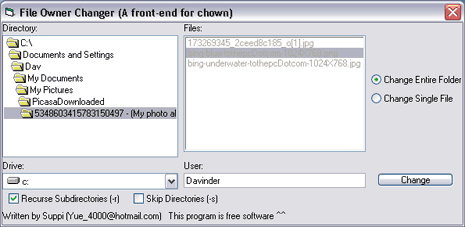
Changing Ownership of a File

Wednesday, October 24, 2012
Windows 8 Augmented Reality - CodeProject
 |
| TV Patrol using Augmented Reality. (Photo credit: Wikipedia) |
Windows 8 Augmented Reality - CodeProject

Wednesday, October 17, 2012
Easily zip / unzip files using Windows Shell32 - CodeProject
 |
| Image via CrunchBase |
If you want to zip / unzip files without using third party libraries, and you want a method that can be used easily and works fine, you can use the Windows Shell32. I've written the code in VB 2010 using .NET Framework 2.0, but it's simple and can be easily converted to any other language like C#.
Easily zip / unzip files using Windows Shell32 - CodeProject

Monday, May 7, 2012
VB.NET wrappers for much of the Windows API - CodeProject®

This might not be classified as an article as it is simply a collection of Windows API wrappers written in VB.NET. It was originally part of shrink-wrapped security software deployed on XP and Vista. Some minor updates might be required on Windows 7 (int -> long, etc.), however, the code has been proven to work.
VB.NET wrappers for much of the Windows API - CodeProject®
Tuesday, April 17, 2012
Geek to Live: Create your own virtual private network with Hamachi

The free Hamachi desktop application gives you secure, zero-configuration LAN over the internet. Any app that works over a local network can be used with Hamachi over the internet, like Windows file sharing, iTunes, Remote Desktop, FTP, VNC and gaming. All of Hamachi's connections are secure, encrypted, authenticated and peer-to-peer. Though Hamachi acts as a mediator between your computers and creates the tunnel for their communication, Hamachi's servers don't listen in on or log your activity.
Geek to Live: Create your own virtual private network with Hamachi

Subscribe to:
Posts (Atom)