 |
| Image via CrunchBase |
Calling Python from Java for Android using CLE and SL4A
Calling Python from Java for Android using CLE and SL4A - CodeProject®

|
| Image via CrunchBase |




 |
| Image via Wikipedia |

 |
| Image via Wikipedia |
VB has a With keyword that you can use to save typing same variables name over and over again. Here's a similar workaround for C#


 |
| Image via CrunchBase |
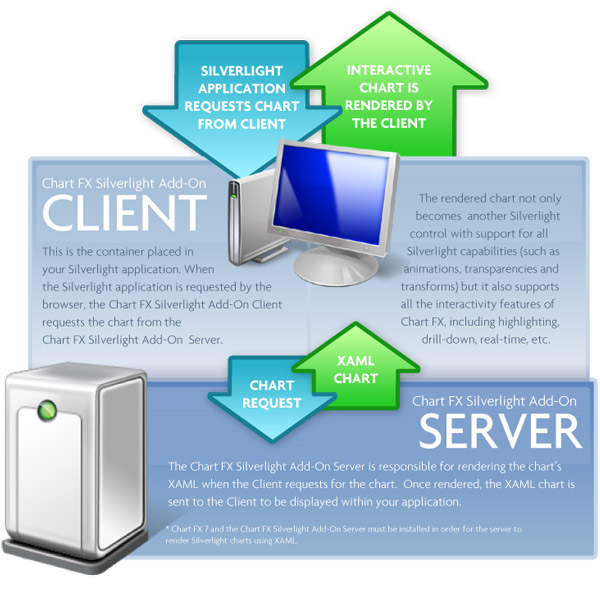
When the Visual Studio 2010 was still on beta I participate on a Microsoft competition from Mexico to develop an application with the new .NET framework 4.0 new the prize was a laptop. So because I like to learn new technologies (like ajax, wpf, linq, sdk of kinect, apis for google maps, google docs, Verifones TPV, fingerprints, a csc, xcode, develop for android etc). I wanted learn about silverlight because I didn't know silverlight and I like draw and I wanted my own page to create a simple comic. I ressearched if there was an existing page for create comics, but I found only a few pages, so I decide to learn silverlight and submit a silverlight application to create a webcomic for the competition.

|
| Image via CrunchBase |

 |
| Image via CrunchBase |


Exploring a simple physics simulation of ferromagnetism with the displaying power of HTML and multi-threading over WebWorker
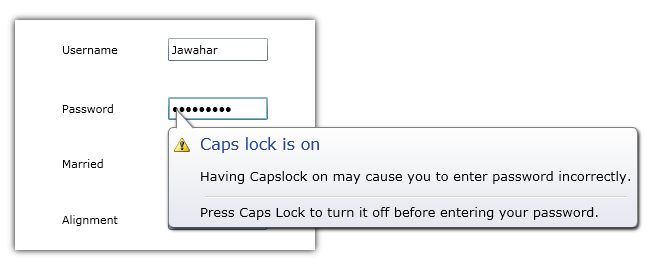
We used to see a Notification tool tip in Windows 7/Vista to inform something about particular context. For example, Capslock warning will be given through a balloon tip on Passwordbox, if capslock has ON. Or sometimes low battery information will be displayed on the Taskbar.

An Ajax control that enables a user to upload a file asynchronously with extra data

 |
| Image via Wikipedia |
How to use simple touch events to capture gestures on the Android platform


This post shows how to create a zip package using System.IO.Compression


 |
| Image via Wikipedia |
Memo about structure of the android project and Support Package.

|
| Image via Wikipedia |
Many of us developers do not look beyond the basic F9, F10, F11, F5 and Watch windows while debugging in Visual Studio. Due to this we end up wasting hours debugging an issue or simulating a condition which ideally could have been achieved in a matter of minutes if we utilized the rich debugging features available out of the box in Visual Studio.Advanced debugging tips are scattered all over the web but I thought that a consolidated list would be very useful for developers to embrace and start using the techniques.

 |
| Image via Wikipedia |
HTML5 is becoming more and more popular. With the increasing popularity of mobile devices such as tablets and smartphones, the need for alternatives to the popular Flash plugin from Adobe has also been growing. Just recently, Adobe announced that Flash will no longer be supported for mobile devices. This means that Adobe itself will focus on HTML5 as a key technology for those devices - and desktop systems sooner or later.
One disadvantage of HTML was the lack of multimedia techniques. In HTML, you could not display a video or draw on the screen. With HTML5, new elements such asandhave been introduced. Those elements give developers the possibility to use multimedia technology in "native" HTML, just by writing some JavaScript in combination with HTML. A basic action that should be provided by multimedia technologies is animation. In HTML5, there are some ways to create such actions.
In this article, I will only compare the new element with the upcoming CSS3 animation technique. Other possibilities would include the creation and animation of DOM elements or SVG elements. Those possibilities will not be included in this discussion. It should be noted from the beginning that the canvas-technology is supported in the current releases of all major browsers, while CSS3 animations are only possible in the latest editions of Firefox and Chrome. The next IE will also provide CSS3 animations.


 |
| Image via Wikipedia |
In last week’s tutorial we used the canvas control to make a character’s eyes follow the mouse. This week Nelly the elephant is back again. This time we will add some animations and use a texture atlas. If you are reading this on Code Project you can see the code in action at the original blog entry.


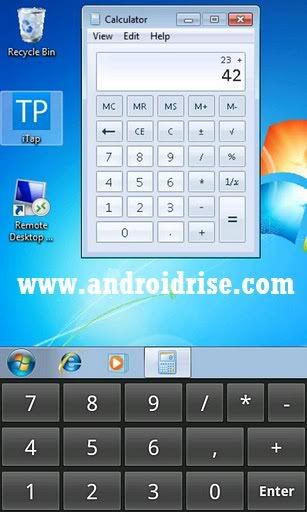 Remote control your Windows PC from your Android Phone!

Suggested technique does not require any graphic files like .jpg or .png, etc. All aesthetic enhancements, like: rounded corners, color gradients, borders and shadows are achieved exclusively via CSS3 styling, thus resulting in very small digital footprint and fast web page load.
Following code snippet demonstrates web page novel styling technique using HTML5/CSS3 advanced features: rounded corners, gradients (in particular, color-stop property), shadows applicable to HTML5 elements, in particular, input, button and div elements.


