Saturday, April 25, 2009

Sharing Power Points


Okay, I have found a really cool tool for sharing powerpoint presentation. You can present them online live. You can embed them in blog/website or convert them into YouTube videos. Best part: It's free. This is a powerpoint that Mitsouky put together of our daughter using pictures from the first few weeks of her life.


Uploaded on authorSTREAM by mmcelhaney

Friday, April 17, 2009

Makayla's 2008 Birthday Party

3D Photo album of Makayla's 2008 Birthday Photos


Monday, April 13, 2009

Tuesday, April 7, 2009

Integrating Twitter, Facebook, and Your Own Content


I have found out how to announce every new blog or YouTube post I make on Twitter and Facebook automatically.

I have 3 blogs. I look at blogging like journaling. This particular blog does not get updated much because it contain my favorite web gadgets and widgets. I use it primarily for testing and sharing information about new technologies. My main blog, What Had Happened Was..., covers my interests in my family, movies, television, history, apologetics, news, and a lot of general stuff. My other blog, Favorite Fiction, is where I share articles and posts on my favorite fictional characters from comics, video games, movies, and other media and has become more like my MUGEN blog, where I can post characters I find and information. I ran into a problem. How do I announce new articles? I realized that Twitter and Facebook are great venues for this. However it is a pain to type out little blurbs and links for each article (I post at least one article a day). The answer is use the same RSS FEEDS that are used for Goggle Reader. There is this service called Twitter Feeds that allows you package your blogs, website, YouTube feed, or any content into an RSS Feed that can be read and published in in Twitter and Facebook! Therefore when I publish an article an alert shows up on Twitter and Facebook. My favorite Fiction blog was getting many visits before I implemented this, but the main blog was getting an average of about 12 visits a day. Since I started feeding Facebook and Twitter the number of visits to my main blog has more than tripled! This could even work on MySpace.

1. Sign up for a Twitter account at Twitter
2. Sign up for a Facebook account at Facebook
3. Sign up for a Twitter Feed account at Twitter Feed
4. Use Twitter Feed to set up a feed for each content source you want to use. In my case I use my 3 blogs and YouTube
5. Set up Facebook so that it uses those feeds from Twitter.
Done!

Google Translate


The Internet is truly global and is definitely not limited to the English speaking world. What if you come across a site that may have information you need but it's in a language you don't know how to read?! Been there? I have. Fortunately, God has given us Google. They have a web service and web site capable of translating words, sentences, or passages and even whole web pages into other languages! Go to Google Translate if you need to translate a word or page. I often use it and then copy/paste the translation into my e-mail. I'm not saying that the translations are as perfect as a human could do but it can help you make yourself understood. On top of that there is even a widget that you can place on your web page or blog that lets readers choose the language they want to read your content in. It's really cool. You can get the widget at the this link.

Monday, April 6, 2009

Chatterous - Chat Widget


I have found an interesting widget that allows one to set up a chat window on any blog or website and have 2-way conversation using the site, or mobile phones, or IMming, or e-mail! It seems interesting. Venture Beat has a great article on Chatterous. Go to Chatterous website and try it out. I've attached a chat widget to this blog post as a test and I think I will try to incorporate it into my other two blogs. Here is the information to join:


Monday, March 30, 2009

Using Mathematics on your Blog

Okay, I have often wondered how to add mathematical equations in blogger. It was perplexing me. So now I have found a couple of solutions.

1. Follow the following prescription on the following blog: Please Make A Note
2. Use the Latex Equation Editor because it allows you type in almost any equation and expression and gives you various forms such as HTML that can just be copied and pasted onto any site or blog you want. For example:


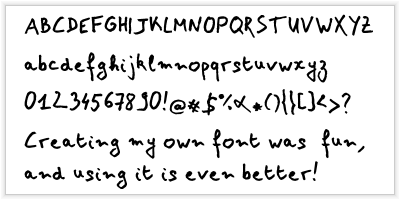
Make Your Own Font


I found a website that allows you to make your own fonts. It’s easy. They provide a template that you download. You then write in all the letters and symbols you want as a part of your font. And then you scan the templates into a *.tiff image files and upload them back into the site. Then you can download a font and install it into you r computer. It is really slick! T think I really need to upload another version because my handwriting is not all that great.


To make your own font, You can go to the following website for more information:

http://www.yourfonts.com/


In case I can't get my font to show up on my blog post I've embedded the page below.


Thursday, February 26, 2009

Saturday, January 31, 2009

Make Money With Amazon

I just found out about the Amazon Affiliate program. Amazon allows you to sell products on your web page or your own e-store in your website! All for free!!! You can even choose the products viewers on your page sees. When someone enters the Amazon.com system from your website/blog and purchase something, Amazon pays you 15%! Amazon even offers you all kinds of tools and visual aids you can easily incorporate into your website or blog. I thought I'd give it a try. Here is an example of my custom Amazon widgets! You can sign up by visiting the Amazon.com Associates program.


Sunday, January 18, 2009

Street Fighter on YouTube

I found out that there is a video where stop-motion animation of Street Fighter Action figures is used. Viewers "fight" by selecting buttons in the video. You can pick characters, and choose fighting moves by clicking buttons in the video, leading to other videos. It's cool. Check it out!

Wednesday, January 14, 2009

Tuesday, December 16, 2008

Sunday, December 14, 2008

Thursday, December 11, 2008

Saturday, December 6, 2008

New SpringWidget

Thursday, December 4, 2008

THE DARK KNIGHT

Friday, November 28, 2008

Terminator 4


Friday, November 21, 2008

Thursday, November 20, 2008

Hancock widget

I haven't seen it. I guess I'll have tyo see the DVD.

Tuesday, November 11, 2008

Heroes Photo Widget

Monday, October 27, 2008

Punisher Movie Widget

This is a newly released track from the newm Punisher Movie soundtrack.

THE SPIRIT WIDGET