Some practical steps to run Microsoft Kinect on a Windows PC
Install Microsoft Kinect on PC - CodeProject
This blog will hold favorite gadgets and graphic user interfaces that don't really fit in my main blog @ mmcelhaney.blogspot.com
Monday, August 10, 2015
Tuesday, August 4, 2015
FrequentlyAskedQuestions - selenium - WebDriver FAQs - Browser automation framework - Google Project Hosting
The following is an excerpt from an article about testing web apps by automating web browsers.
FrequentlyAskedQuestions - selenium - WebDriver FAQs - Browser automation framework - Google Project Hosting
Q: What is WebDriver?
A: WebDriver is a tool for writing
automated tests of websites. It aims to mimic the behaviour of a real
user, and as such interacts with the HTML of the application.
FrequentlyAskedQuestions - selenium - WebDriver FAQs - Browser automation framework - Google Project Hosting
Labels:
App,
Selenium,
Web,
web app,
Web application,
Web Browser,
Web driver,
webdriver
Thursday, May 14, 2015
Tuesday, April 21, 2015
Rudimentary PDF Generation in C# Using iTextSharp - CodeProject
Here is a great article about how to make your code generate PDF files
Rudimentary PDF Generation in C# Using iTextSharp - CodeProject
Saturday, April 11, 2015
Convert doc/docx documents to PDF with Foxit Reader - CodeProject
Here is another slick way to convert a word document into a pdf using
Convert doc/docx documents to PDF with Foxit Reader - CodeProject
Tuesday, April 7, 2015
Watching Folder Activity in VB.NET - CodeProject
I just found out that the .Net framework allows you to watch files and folders from code. Here are two articles about how to use this function.
Watching Folder Activity in VB.NET - CodeProject
File System Watcher Class Demo (VB.NET)
Watching Folder Activity in VB.NET - CodeProject
File System Watcher Class Demo (VB.NET)
.net - Strange -1.#IND error in VB.net - Stack Overflow
Ever raised a negative number to a fractional power in a VB.Net program? Don't do it!!! Here is an article on how VB.net handles that!
.net - Strange -1.#IND error in VB.net - Stack Overflow
Thursday, March 26, 2015
Remote Debugging Using Visual Studio 2013
Eureka!!!!
I got the remote debugger to work on a web server ! This site
helped me to connect Visual Studio 2013 to web server.
And here is the link for how to install the tools :
Thursday, March 5, 2015
Converting DataTable Contents into a PDF Report
I came across the need to convert DataTable into a PDF report and I found a couple of articles to show exactly how to do it. I was able to edit it for my use. Both articles use iTextSharp. It worked great!
VB.Net version
C# version
VB.Net version
C# version
Labels:
C#,
DataTable,
iText,
iTextSharp,
PDF,
Programming,
VB.NET
Tuesday, February 17, 2015
Monday, February 16, 2015
Sunday, February 8, 2015
Monday, February 2, 2015
Thursday, January 15, 2015
Loading & Using VisualBasic 6 Legacy Projects on Windows 7 - How To Register Legacy Typelibs on Modern Microsoft OS (Kim Gentes/Worship Tech Blog) - Worship Tech/Web Tools Blog - Kim Gentes - worship leader and writer
This problem came up for me just a few days ago. This fixed my problem!
Convert VB.NET to Python - A free code conversion tool - developer Fusion
Need to convert VB.Net to Python? Try this.
Convert VB.NET to Python - A free code conversion tool - developer Fusion
Labels:
Converters,
Language Conversion,
Programming,
Python,
VB.NET
Connecting to ODBC Databases from Python with pyodbc
Another article about pyodbc that gives Python a library for accessing ODBC Databases!
Connecting to ODBC Databases from Python with pyodbc
Wednesday, December 17, 2014
Displaying IIS Server Metrics
A significant problem has developed for me: how to let a user of as silverlight app know what is going on the web server running it? For example: How many users are on it? Is there a process hogging all the resources? Does the app have enough bandwidth to run properly? Turns out IIS 7 does provide tools to query and serve up this information in real time!
http://www.iis.net/overview/control/powerfuladmintools
And one such feature is being able to use PowerShell to script the tools to provide the data you want.
http://www.iis.net/downloads/microsoft/powershell
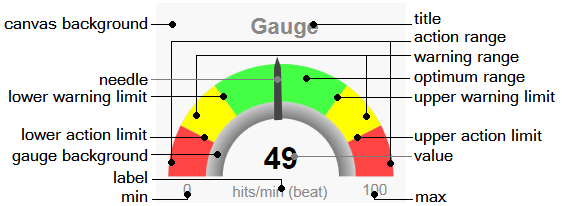
And on codeproject.com there was an article about putting real-time gauges on a web site,. This could be a great tool for displaying the data to users.
http://www.codeproject.com/Articles/604502/A-Universal-Gauge-for-Your-Web-Dashboard
http://www.iis.net/overview/control/powerfuladmintools
And one such feature is being able to use PowerShell to script the tools to provide the data you want.
http://www.iis.net/downloads/microsoft/powershell
And on codeproject.com there was an article about putting real-time gauges on a web site,. This could be a great tool for displaying the data to users.
http://www.codeproject.com/Articles/604502/A-Universal-Gauge-for-Your-Web-Dashboard
Labels:
IIS,
Powershell,
Servers,
web server,
Windows PowerShell
Tuesday, August 26, 2014
Running 32bit powershell on a 64bit server from c# - Stack Overflow
It is possible to get a Powershell to check to see what platform is running: 21 or 64-bit.
Running 32bit powershell on a 64bit server from c# - Stack Overflow
if ([System.IntPtr]::Size -eq 8) {'64-bit'} else {'32-bit'}Running 32bit powershell on a 64bit server from c# - Stack Overflow
Labels:
Poweshell,
Scripts,
Tutorial,
Tutorial Programming,
Windows PowerShell
Friday, August 22, 2014
Using Powershells Scripts in Software Solutions
I've been working on a project that will require being able to run Powershell scripts from a Silverlight application. What we want is to give users the option of running their own scripts to do calculations that our app does not already do. Fortunately, one of my co-workers has already figured out how to add add a routine to run Powershell scripts. All we need to do is to pass it the script as a text string. He used two articles to write the service we are using:
http://www.codeproject.com/Articles/18229/How-to-run-PowerShell-scripts-from-C
http://www.codeproject.com/Articles/18409/Asynchronously-Execute-PowerShell-Scripts-from-C
In addition there are three things that came up in trying to write Powersehell scripts. 1. The set-excutionpolicy cmdlet must be set on the computer that will run the scripts. A good link for understanding what your options is: http://technet.microsoft.com/en-us/library/ee176961.aspx
You should choose the option that is best for your situation. Because our app will be on a webserver, we will need to use high security like the policy "allsigned" because then only signed scripts will be allowed to run.
2. This choice means that I had to figure out how to digitally sign my scripts. One easy way would have been to buy a digital certificate from Globalsign or Verisign. Problem is that this can be expensive, so I opted for self-signing. Searching the internet kept turning up a solution such as:
http://powershellscripts.com/article3_powershell_script_signing.html
The problem with this is that I could not install the sdk so I could run MakeCert.exe This means that I could not create a certificate let alone sign my scripts. But I found a Powershell scripts that creates a certificate for free and when I tired to use the certificate, it worked! You can find the script at:
http://itproguru.com/expert/2013/10/how-to-create-a-self-signed-computer-certificate-using-powershell-step-by-step-much-easier-than-makecert-exe/
The following article explains what to do with the certificate after generating it. One important thing to remember is that when the script is signed, it is important to export the certificate because if you wanna run the script on a different computer than the one you wrote the script on, you have to install your certificate on that computer.
http://www.hanselman.com/blog/SigningPowerShellScripts.aspx
I did find a problem. Sometimes you may get an error when you try to run:
PS C:\> Set-AuthenticodeSignature c:\foo.ps1 @(Get-ChildItem cert:\CurrentUser\My -codesign)[0]
where C:\foo.ps1 is the name of the script you are signing. The error is an "Unknown Error". Here is a link that explains how to fix it. I just opened the script in notepad and then resaved it and the error went away just like the article said it would
http://blogs.msdn.com/b/vijay/archive/2010/07/13/quot-set-authenticodesignature-quot-returns-unknown-error-while-registering-the-script-with-a-certificate.aspx
3. The other issue is that some scripts require administrative permissions to run properly. It would be best if the program could elevate itself rather than be ran from a prompt with administrative permission. This is very important for me too because I'm calling the script from Silverlight not from a command prompt. But this article saved me.
http://stackoverflow.com/questions/7690994/powershell-running-a-command-as-administrator
All in all,putting these three things together will mean being able to write powershell scripts in any Windows environment.

http://www.codeproject.com/Articles/18229/How-to-run-PowerShell-scripts-from-C
http://www.codeproject.com/Articles/18409/Asynchronously-Execute-PowerShell-Scripts-from-C
In addition there are three things that came up in trying to write Powersehell scripts. 1. The set-excutionpolicy cmdlet must be set on the computer that will run the scripts. A good link for understanding what your options is: http://technet.microsoft.com/en-us/library/ee176961.aspx
You should choose the option that is best for your situation. Because our app will be on a webserver, we will need to use high security like the policy "allsigned" because then only signed scripts will be allowed to run.
2. This choice means that I had to figure out how to digitally sign my scripts. One easy way would have been to buy a digital certificate from Globalsign or Verisign. Problem is that this can be expensive, so I opted for self-signing. Searching the internet kept turning up a solution such as:
http://powershellscripts.com/article3_powershell_script_signing.html
The problem with this is that I could not install the sdk so I could run MakeCert.exe This means that I could not create a certificate let alone sign my scripts. But I found a Powershell scripts that creates a certificate for free and when I tired to use the certificate, it worked! You can find the script at:
http://itproguru.com/expert/2013/10/how-to-create-a-self-signed-computer-certificate-using-powershell-step-by-step-much-easier-than-makecert-exe/
The following article explains what to do with the certificate after generating it. One important thing to remember is that when the script is signed, it is important to export the certificate because if you wanna run the script on a different computer than the one you wrote the script on, you have to install your certificate on that computer.
http://www.hanselman.com/blog/SigningPowerShellScripts.aspx
I did find a problem. Sometimes you may get an error when you try to run:
PS C:\> Set-AuthenticodeSignature c:\foo.ps1 @(Get-ChildItem cert:\CurrentUser\My -codesign)[0]
where C:\foo.ps1 is the name of the script you are signing. The error is an "Unknown Error". Here is a link that explains how to fix it. I just opened the script in notepad and then resaved it and the error went away just like the article said it would
http://blogs.msdn.com/b/vijay/archive/2010/07/13/quot-set-authenticodesignature-quot-returns-unknown-error-while-registering-the-script-with-a-certificate.aspx
3. The other issue is that some scripts require administrative permissions to run properly. It would be best if the program could elevate itself rather than be ran from a prompt with administrative permission. This is very important for me too because I'm calling the script from Silverlight not from a command prompt. But this article saved me.
http://stackoverflow.com/questions/7690994/powershell-running-a-command-as-administrator
All in all,putting these three things together will mean being able to write powershell scripts in any Windows environment.
Tuesday, August 12, 2014
A self elevating PowerShell script - Ben Armstrong - Site Home - MSDN Blogs
Here is a link to an article sharing a powershell script that will cause a powershell script to elevate itself to run as administrator! It does work extremely well! I've added it to three of my powershell scripts and it works as advertized. I did learn to paste this code after the declaration of powershell commandline variables are defined!
A self elevating PowerShell script - Ben Armstrong - Site Home - MSDN Blogs
Sunday, August 3, 2014
Installing MoSync for Android (and other mobile platforms) - CodeProject
Introduction
Installing MoSync for Android (and other mobile platforms) - CodeProject
Enter MoSync. The
MoSync Software Development Kit is a complete development environment
for all those platforms, and more. You write your program in C/C++ (or
Java), and MoSync will compile it for the platforms you choose. By using
the APIs provided, your application will work on all those devices,
without any changes.
Installing MoSync for Android (and other mobile platforms) - CodeProject
Saturday, August 2, 2014
Manage YouTube using C# and Youtube API 1.6 - CodeProject
This article explains how to write a program that uses YouTube using its API
Manage YouTube using C# and Youtube API 1.6 - CodeProject
C# Get Frames from a GIF - CodeProject
Article explaining how to get the frames of an animated GIF using C#
C# Get Frames from a GIF - CodeProject
Subscribe to:
Posts (Atom)