
Use Android Phone as Webcam and Surveillance Camera - CodeProject
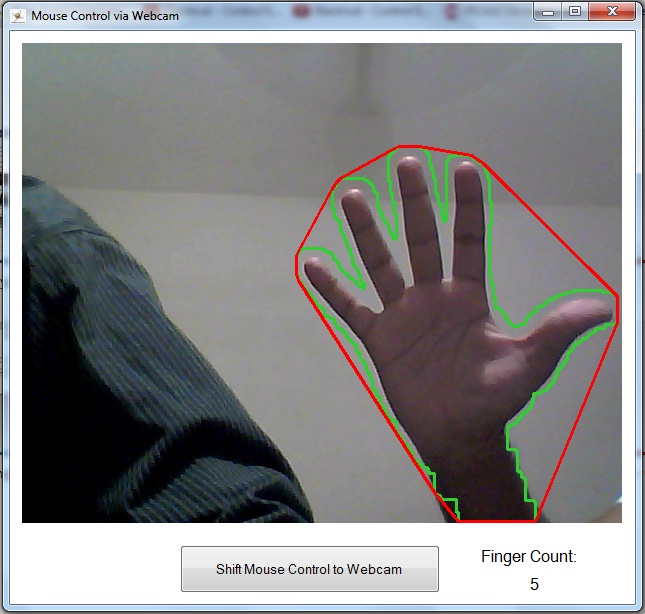 Ever wanted to use your mouse on your PC with hand gestures? Some students have figured out how to do that without using Kinect but with just the webcam!
This application uses emguCV, a .NET wrapper for openCV, to perform image processing, through which we try to recognize hand gestures and control mouse using these gestures. In this app, cursor movement is controlled by the movement of hand and click events are triggered using hand gestures.

 |
| English: Grayscale image of a Microsoft LifeCam VX-3000 webcam attached to a display. (Photo credit: Wikipedia) |
Nowadays, Webcam is widely used for both personal and business. It is simple, cheap, and yet powerful for image acquisition.
Some developers prefer to create their own webcam libraries. In this case, you need to learn technologies like TWAIN, WIA and/or DirectShow.
Note: the WIA and DirectShow APIs are recommended to develop a webcam SDK. TWAIN, however, is a good option for scanners.
However, due to the complexity of learning the APIs, as well as the technologies such as COM interfaces, it’s not an easy task for developers to create and embed Webcam SDK into their web applications. There are two options to simplify the whole process:
I will talk more about the second option in this article.
- Use a third-party plug-in/add-on to access and control the webcams, such as Flash, Silverlight, etc.
- Adopt the new technology – HTML5.
Webcam devices will be supported by the new video element and the getUserMedia API in HTML5. This means we can capture video streams and images from Webcam devices with just a few lines of JavaScript and HTML code, and the end users do not need to install anything for the browsers.

 Introduction to article by Meshack Musundi
I have on several occasions scoured the net for a simple to use WPF webcam control and either my search queries were awful or I just wasn't comfortable with whatever I found. This webcam interest was recently increased when I read an article, here on CodeProject, that referred to an application that made use of a webcam. It was a Silverlight article and the ease with which one could utilize a webcam in Silverlight made me envious of WPF's little brother (or is it sister?). The VideoBrush in Silverlight is especially a nice touch.
It is with this pain and envy in mind that I decided to try my hand at creating a WPF control that could;
- Display webcam video with little coding effort
- Allow saving of webcam video to harddisk, with little coding effort
- Save the webcam video in a variety of video formats
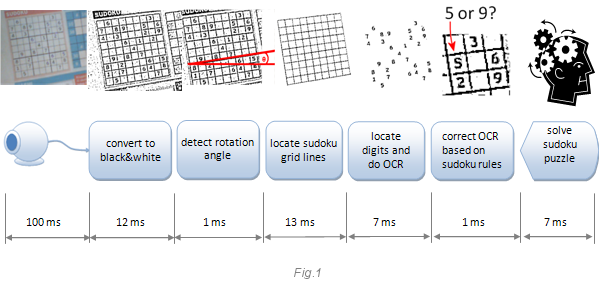
This application might not have any practical value, but it is great from a learning perspective. I wanted to learn about computer vision. Computer vision is one of the most exciting areas of modern computing. It is also a difficult area. What is simple and obvious for the human brain is very difficult for a computer. Many things are still impossible with the current level of IT progress.
This application is implemented using low level C++ because I wanted to learn how things work under the hood. If you’d like to start with a computer vision application, you should take an existing library (like OpenCV) and start from there. You can find several tutorials here on CodeProject. The webcam image gathering source code is from from Vadim Gorbatenko (AviCap CodeProject).
The webcam acquires one image at a time (a frame). The flow of frames gives the impression of motion. The next image explains what this application does within a webcam frame.


If you are interested in using your webcam from C# in an easy way, this little article is for you. In order to achieve our goal, we need the Microsoft .NET 4.0 and Microsoft Expression Encoder 4. You can get the latter for FREE, using the 'Microsoft Web Platform Installer', that can be downloaded from here: http://www.microsoft.com/web/downloads/platform.aspx


